Hubby: Elevating Your Design with Elegant Script
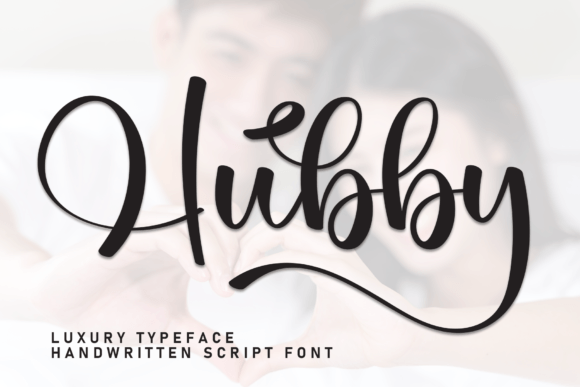
When you are staring at a blank canvas, whether it is a digital mockup for a wedding invitation or a logo concept for a new boutique, the right typography can make all the difference. Hubby stands out as a stylish and incredibly elegant script font that brings a distinct handwritten touch to any project. It is not merely a collection of letters; it is a tool designed to convey warmth, sophistication, and personal connection. However, simply downloading a beautiful typeface does not guarantee success. Many creators fall into traps when integrating such specific fonts into their workflows, often leading to designs that look amateurish rather than refined.
To truly harness the power of this elegant script, you need to understand its nuances, avoid common pitfalls, and apply it with intention. This guide walks you through the essential considerations for using Hubby effectively, ensuring your final output matches the high standards set by the font itself.
Understanding the Allure of Handwritten Typography
In a digital world dominated by clean, geometric sans-serifs, there is a growing demand for authenticity. People crave the feeling of a personal note. That is where Hubby shines. Its fluid strokes mimic the natural movement of a calligraphy pen, making it perfect for contexts where human emotion needs to be front and center. From thank you cards to greeting cards, the font adds a layer of intimacy that standard typefaces cannot replicate.
However, the "handwritten" aesthetic is deceptive. It requires a level of precision to look intentional rather than messy. If you treat a script font like a standard body text, you risk losing readability and elegance simultaneously. The key lies in knowing exactly where to apply this style and where to hold back.
The Trap of Overuse and Legibility Issues
One of the most frequent mistakes designers make is attempting to use Hubby for long paragraphs or small print details. While the font is stunning for headlines, logos, and short quotes, it lacks the structural rigidity required for dense blocks of text. When used incorrectly, it creates visual fatigue for the reader. A wedding invitation might look magical with a paragraph of the bride's name in script, but reading the fine print regarding the venue address in the same font can be a struggle.
Correction: Adopt a pairing strategy. Use Hubby for the emotional core of your design—the names, the main title, or the primary message—and pair it with a highly legible serif or sans-serif font for all secondary information. This contrast ensures that your design remains beautiful without sacrificing functionality.
Technical Nuances: Ligatures and Spacing
Even if you have selected the right context for the font, technical execution matters immensely. High-quality script fonts like Hubby rely heavily on ligatures—special character combinations that connect letters smoothly to prevent awkward gaps or collisions. If you are working in software that does not support OpenType features, or if you manually type out words instead of letting the font engine handle them, the result can look disjointed.
Another overlooked detail is kerning, or the spacing between individual characters. In blocky fonts, you often get away with auto-tracking, but scripts require manual adjustment. Letters in a flowing script naturally want to lean on one another; if they are too far apart, the word breaks visually. If they are too close, they merge into an unreadable blob.
- Avoid: Relying solely on default tracking settings for script text.
- Do: Zoom in to 200% and inspect every letter pair. Adjust spacing so the flow feels continuous but the characters remain distinct.
- Check: Ensure your design software has the correct font file loaded (usually .OTF) to access advanced ligatures.
The Cost of Poor Contrast
Many users underestimate the importance of color and weight contrast when using elegant scripts. Because Hubby is thin and delicate, placing it on a busy background or against a low-contrast color scheme can render it invisible or muddy. A common error occurs when marketers try to overlay white script text on a light beige image, assuming the "elegant" nature of the font will carry it. Instead, the design looks washed out and unprofessional.
Solution: Always test your text in grayscale first. If you cannot clearly distinguish the font from the background in black and white, you will likely struggle with color contrast as well. Use dark backgrounds for light scripts or vice versa. For business cards and logos, consider adding a subtle drop shadow or a solid backing shape to ensure the script pops against the material.
Evaluating Usage Scenarios: Where Hubby Fits Best
To maximize the return on your investment in this font, you must match it to the right application. Hubby is versatile, but it has limits. Understanding these boundaries prevents wasted time and resources.
- Wedding Invitations: This is the ideal use case. The font conveys romance and tradition perfectly. Ensure the paper quality complements the elegance of the typeface.
- Logos and Branding: For businesses wanting a boutique or artisan feel, Hubby works well. However, ensure the logo scales down effectively. Thin scripts often disappear when reduced to social media avatars or mobile screens.
- Quotes and Social Media Graphics: Short, punchy quotes benefit greatly from the handwritten vibe. Pair with a bold headline to create hierarchy.
- Business Cards: Use sparingly. A name in Hubby looks chic, but the contact details should be in a clean, modern font to maintain professional clarity.
If you attempt to force Hubby into a corporate financial report or a technical manual, you will clash with the intended tone of seriousness and authority. Recognizing when not to use the font is just as important as knowing when to use it.
Buying vs. Downloading: Licensing Matters
Before you finalize your design, check the licensing terms associated with Hubby. Not all fonts are created equal. Some are free for personal use only, meaning you cannot use them for client work, commercial products, or marketing materials without purchasing a license. Using a font without the proper rights can lead to legal issues and unexpected costs later.
Actionable Advice: Always verify the source. If you are a freelancer or small business owner, purchase the commercial license to protect yourself. Review the end-user agreement to see if you are allowed to modify the glyphs or embed the font in PDFs. Skipping this step is a costly mistake that can undo years of good work.
Making the Final Decision
Ultimately, choosing Hubby is about more than just picking a pretty font; it is about curating an experience for your audience. By avoiding the pitfalls of overuse, neglecting technical settings like ligatures, and ignoring contrast requirements, you ensure that your design communicates the right message.
Take the time to experiment. Create a mood board. Test different pairings. Look at how the font behaves at different sizes. When you approach Hubby with respect for its characteristics and a clear understanding of its limitations, you unlock its full potential. Whether you are crafting a heartfelt thank you card or a sophisticated brand identity, this elegant script can elevate your work from good to unforgettable.
Remember, great design is often defined by what you leave out as much as what you put in. Let the elegance of the script speak for itself, supported by strong structure and thoughtful composition.