Jayakarta: Unlocking Playful Design Without the Pitfalls
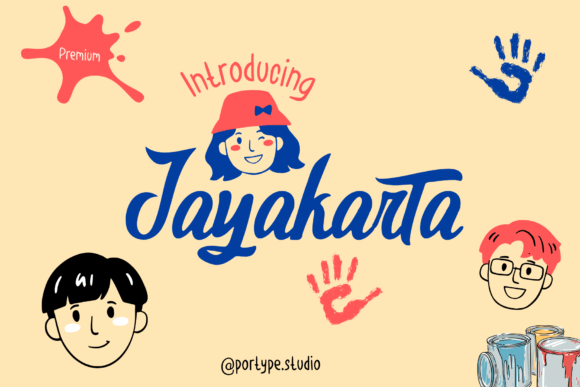
If you are looking to inject a genuine sense of joy into your next creative project, Jayakarta Font stands out as a vibrant and playful script that captures attention immediately. Designed with flowing lines and dynamic strokes, this typeface brings a delightful charm to greeting cards, invitations, posters, and branding materials. However, while the visual appeal is undeniable, using a display font like Jayakarta effectively requires more than just downloading it and applying it to every headline. Many creators make the mistake of assuming that "playful" means "easy to use," leading to designs that feel chaotic rather than curated.
To truly leverage the versatility of Jayakarta for your design endeavors, you need to understand its strengths and limitations. Whether you are a small business owner crafting a local event flyer or a marketer building a brand identity, the difference between a professional result and an amateur one often lies in how you handle script typography. This guide explores common pitfalls associated with this font and offers practical strategies to ensure your work remains legible, balanced, and impactful.
Understanding the Character of Jayakarta
Jayakarta is not a standard serif or sans-serif typeface; it is a script designed to mimic hand-lettered energy. Its dynamic strokes suggest movement and creativity, making it perfect for projects that need to feel personal and fun. When used correctly, it transforms a mundane document into something memorable. However, because it is so expressive, it demands respect from the designer. It is not a utility font meant for long blocks of text or technical specifications.
The primary reason designers gravitate toward Jayakarta is its ability to convey personality instantly. In a digital landscape saturated with rigid, corporate typefaces, a touch of whimsy can break through the noise. Yet, this same quality is what causes problems if misapplied. The flowing nature of the letters creates connections that may be difficult for some readers to follow if they are too small or crowded.
The Legibility Trap
One of the most frequent errors when adopting Jayakarta Font is overestimating its readability. Beginners often try to use it for body copy, assuming that because it looks nice, it will read easily. This is a critical misunderstanding. Script fonts generally have lower x-heights and variable stroke widths, which reduces clarity at smaller sizes or on low-resolution screens.
- The Mistake: Using Jayakarta for paragraphs, terms and conditions, or detailed instructions.
- The Consequence: Your audience struggles to read the content, leading to disengagement or confusion about your message.
- The Fix: Reserve Jayakarta for headlines, logos, and short pull quotes. Pair it with a highly legible sans-serif font for all supporting text.
By keeping the script to where it shines—catching the eye—you maintain the balance between style and function. A design should communicate clearly first and entertain second. If the font makes the user pause to decipher words, the design has failed its primary purpose.
Common Implementation Errors to Avoid
Beyond legibility, there are several nuanced mistakes that can undermine the quality of your work. These errors often stem from a lack of testing or a failure to consider the context in which the font will appear.
Mismatching Contexts
Not every project needs a splash of whimsy. While Jayakarta is fantastic for birthday invitations or children's educational materials, it can clash with serious branding or professional reports. Using a playful script in a financial newsletter or a medical pamphlet can erode trust. Readers expect stability and precision in those fields, and a font with dynamic, swirly strokes might signal a lack of seriousness.
Advice: Before finalizing your choice, ask yourself what emotion you want to evoke. If the goal is authority and reliability, stick to clean geometric fonts. If the goal is approachability and fun, Jayakarta is an excellent candidate. Always align the typography with the industry standards of your specific niche.
Neglecting Spacing and Kerning
Script fonts like Jayakarta rely heavily on the relationship between individual characters. Unlike block letters, scripts often have connecting strokes that require precise spacing to look natural. A common oversight is accepting the default kerning settings provided by software without adjustment.
If letters are too close, they may merge into an illegible blob. If they are too far apart, the flow of the script is broken, and the word loses its rhythm. This issue is particularly acute when resizing text; a size that looks perfect on a desktop monitor might look disjointed on a mobile device.
- Check Variable Sizes: Test your headline in various sizes, from large banners down to social media thumbnails.
- Adjust Manually: Don't be afraid to tweak the tracking (letter-spacing) slightly to open up the text for better breathing room.
- Watch the Connectors: Ensure that the connections between letters remain distinct and do not create accidental shapes that confuse the reader.
Evaluating Quality Before You Download
Before you commit to using Jayakarta in a commercial project, it is vital to evaluate the file itself. Not all font downloads are created equal. Some versions found on free repositories may lack necessary OpenType features or contain glyph errors that cause printing issues later.
A high-quality version of Jayakarta should offer a range of weights and styles, including ligatures that automatically connect certain letter pairs for a smoother look. If you are purchasing the font, verify that the license covers your intended use, whether that is web usage, print, or merchandise. Free licenses often restrict commercial application, which can lead to legal headaches for entrepreneurs and freelancers.
What to check before buying or downloading:
- Character Set: Does it include accented characters if you need international support?
- Ligatures: Are there automatic substitutions for common pairs like "fi" or "fl" to improve aesthetics?
- File Format: Ensure you get OTF or TTF files compatible with your design software.
- Licensing Terms: Confirm that the license allows for the scale of your project.
Practical Strategies for Better Results
To avoid the frustration of a poorly executed design, adopt a structured approach to integrating Jayakarta. Start by creating a mood board that includes the font alongside potential images and color palettes. This helps visualize how the "flowing lines" interact with other elements.
When designing, always prioritize hierarchy. Use Jayakarta for the most important message, but ensure the secondary information supports it rather than competing with it. For example, on an invitation, use Jayakarta for the names and the date, but use a clean, simple font for the time, location, and RSVP details. This contrast ensures that the whimsical element adds charm without sacrificing essential information.
Furthermore, consider the medium. A poster printed on glossy paper will render the fine details of the script differently than a website displayed on a phone screen. Test your design across different devices and formats before going live. If the thin strokes of the font disappear on a small screen, you may need to increase the font weight or adjust the line height.
Combining for Maximum Impact
The secret to professional-looking typography often lies in pairing. Jayakarta works beautifully when paired with a neutral, modern sans-serif. The contrast between the organic, human feel of the script and the structured, reliable nature of a sans-serif creates a dynamic tension that is visually engaging. This combination allows you to enjoy the personality of Jayakarta while maintaining the clarity required for effective communication.
By approaching Jayakarta with these considerations in mind, you move beyond simply using a "fun font" to creating intentional, polished designs. Remember, the goal is to infuse your work with a sense of joy and personality, not to let the font dictate the entire narrative. With careful planning and attention to detail, you can unleash your imagination and produce results that are both beautiful and functional.
Take the time to explore the versatility of this typeface. Download Jayakarta today, test it rigorously, and apply it where it truly belongs. When used with wisdom and care, it becomes more than just a font; it becomes a powerful tool for storytelling that resonates with your audience on an emotional level.