Life Planner: A Neat and Casual Script Font for Real-World Design
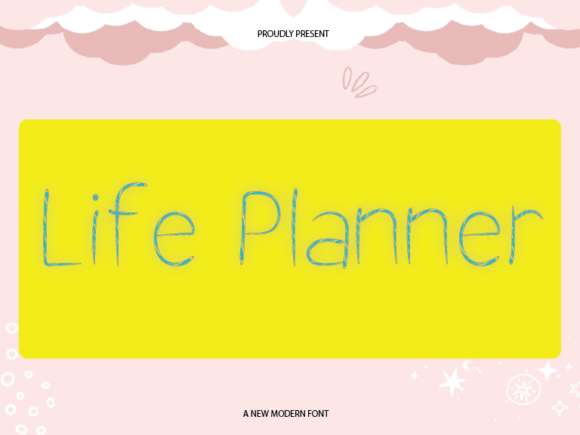
You know that feeling when you are staring at a blank page, trying to organize your thoughts or sketch out a new project, but the text just feels too rigid? It happens to everyone from busy freelancers to creative entrepreneurs. Sometimes, the words on the screen feel cold, corporate, or overly formal, which kills the vibe of your work before it even begins. This is where Life Planner steps in as a practical solution. It is not just another decorative typeface; it is a neat and casual script font that combines simplicity with a touch of warmth.
With clean lines and balanced proportions, this font exudes a friendly and approachable vibe. It bridges the gap between professional clarity and personal connection. Whether you are designing a wedding invitation, a blog header, or a small business invoice, using Life Planner can instantly shift the tone of your content from sterile to inviting. It works because it mimics the natural flow of handwriting without sacrificing readability.
Understanding the Vibe of Life Planner
When designers talk about "personality" in typography, they usually mean how a font makes a reader feel. Most sans-serif fonts aim for neutrality, while heavy serifs often signal tradition or authority. Life Planner occupies a unique middle ground. It is neat enough to be legible at smaller sizes but casual enough to suggest a human touch.
The font's structure relies on balanced proportions, meaning the spacing between letters and the height of the characters are carefully calibrated. This ensures that even though it looks like a script, it does not look messy or hard to read. The warm quality comes from the slight variations in stroke weight, which gives each letter a subtle organic feel. This makes it perfect for projects where you want to build trust and rapport with your audience immediately.
Real-World Applications for Creators and Entrepreneurs
The true value of a font like Life Planner is found in how it solves specific problems in real-world scenarios. Instead of listing features mechanically, let's look at how different users actually apply this tool in their daily workflows.
For Bloggers and Content Creators
If you run a lifestyle blog or a personal journal site, your content likely revolves around stories, tips, and experiences. Using a standard Arial or Times New Roman for your headlines might make your site feel like a textbook. By incorporating Life Planner into your post titles or pull quotes, you create an immediate sense of intimacy with your readers.
- Scenario: You are writing a post about "Morning Routines for Productivity." Using Life Planner for the main title makes the reader feel like a friend is sharing advice rather than a corporation issuing a directive.
- Outcome: Higher engagement rates as visitors feel more connected to the author's voice.
For Small Business Owners and Marketers
Small businesses often struggle to stand out against big corporations. They need to emphasize their community-focused nature. If you own a boutique coffee shop, a handmade jewelry brand, or a local bakery, your marketing materials should reflect the care put into your products.
Imagine creating a weekly newsletter or a special offer flyer. When you use Life Planner for the subject line or the key offer details, it softens the sales pitch. It suggests that there is a real person behind the brand who cares about the customer. This is particularly effective for email marketing campaigns where building a relationship is more important than a hard sell.
For Educators and Hobbyists
Teaching can sometimes feel dry if the materials look too official. Whether you are a teacher preparing worksheets, a tutor creating study guides, or a hobbyist documenting a DIY project, Life Planner adds a layer of encouragement.
Consider a teacher making a certificate of completion for a student. A stiff font might make it feel like a bureaucratic document. However, using Life Planner transforms it into a keepsake that celebrates the student's effort. Similarly, for hobbyists creating recipe cards or scrapbook layouts, the font captures the nostalgia and joy associated with these activities.
When to Use (and When to Avoid) Life Planner
While Life Planner is incredibly versatile, it is not a magic bullet for every design challenge. Understanding the context is crucial for getting the best results. You should consider the medium and the message before downloading or applying this font.
Digital vs. Print: Because Life Planner has clean lines, it works exceptionally well on digital screens, from mobile app interfaces to social media graphics. However, if you plan to print it at very small sizes (like under 8 points), ensure you test it first. Scripts can sometimes lose definition when scaled down too much, so keep the text large enough to maintain its character.
Balancing Act: One of the most common mistakes designers make is overusing script fonts. Life Planner is strong enough to carry a headline, but it can become overwhelming if used for long paragraphs of body text. The best practice is to pair it with a simple, neutral sans-serif font for the bulk of your content. For example, use Life Planner for the title "Summer Sale" and a clean geometric font for the terms and conditions below it. This contrast highlights the script while maintaining readability.
Practical Considerations Before You Start
Before you commit to using Life Planner in a major project, there are a few practical steps to take to ensure success. First, always download the full font family if available. Many scripts come in different weights or styles, such as regular, bold, or italicized versions. Having these options allows you to create hierarchy within your design without switching to a completely different font.
Second, think about your color palette. A script font like Life Planner often benefits from softer, warmer colors like terracotta, sage green, or muted gold. High-contrast black and white can sometimes make the script feel too harsh, whereas a slightly softer background allows the warm lines of the letters to shine through.
Finally, consider your audience. Are they tech-savvy professionals looking for efficiency, or are they looking for inspiration and comfort? If your audience expects speed and data, a script might distract them. But if they are looking for a story, a personal touch, or a creative spark, Life Planner is exactly what they need to feel engaged.
Connecting Features to Real Outcomes
Ultimately, the goal of any design tool is to facilitate communication. Life Planner achieves this by removing the barrier of formality. When you use a font that feels like a handwritten note, you are signaling authenticity. In a world saturated with AI-generated content and robotic stock photos, having a human element in your design is a powerful differentiator.
Whether you are planning a wedding, launching a new product, or simply organizing your personal life with a custom planner, the right typography sets the stage. Life Planner provides that stage with a backdrop that is neat, organized, yet undeniably warm. It invites people in, encourages them to stay, and helps them connect with the message you are trying to convey. By choosing this font, you are making a conscious decision to prioritize connection over convention, turning ordinary designs into memorable experiences.